
BIM Coordinator vs BIM Manager: Dubai Career Guide
Confused between BIM Coordinator and BIM Manager roles in Dubai? Learn the key differences, responsibilities, and career path in the UAE AEC industry.
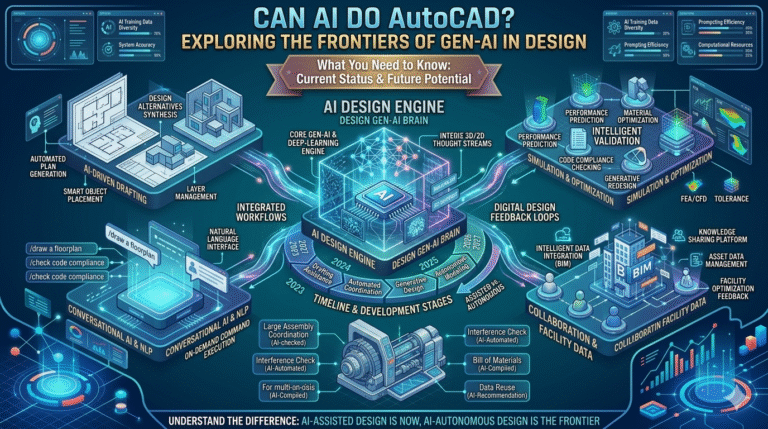
In the ever-evolving world of computer-aided design (CAD), the rise of artificial intelligence (AI) has sparked intense debate among draftsmen and architects: Is manual drafting dead? Can AI truly handle AutoCAD projects better than humans? As we approach 2026, AI’s integration into AutoCAD is transforming standard technical drawings and layouts from labor-intensive tasks into efficient, intelligent processes.
For professionals who spend hours on repetitive drafting, dimensioning, and revisions, AI promises to address key pain points like workflow inefficiencies, data integration challenges, and cost overruns caused by manual errors or delayed iterations. By automating routine elements while preserving human oversight for creative and complex decisions, AI isn’t replacing draftsmen—it’s empowering them to focus on high-value aspects like design intent, client collaboration, and innovation.
Historically, AutoCAD has been the backbone of 2D and 3D drafting since its inception in 1982, evolving from basic line drawing to sophisticated parametric modeling. However, traditional manual drafting often leads to bottlenecks: inconsistent standards across teams, time lost to repetitive commands, and difficulties integrating data from various sources like surveys or BIM models.
AI steps in to mitigate these, using machine learning to analyze patterns, suggest optimizations, and even generate elements autonomously. In AutoCAD 2025 and the upcoming 2026 releases, features like the Autodesk Assistant provide natural language commands, allowing users to say “add a 2×4 wall here” and see it executed precisely.
This shift reduces cost overruns by minimizing rework—studies show AI-assisted drafting can cut project timelines by up to 30%, directly impacting profitability for architectural firms handling tight deadlines.
For professionals ready to master AI-enhanced AutoCAD, consider specialized training at AutoCAD training in Dubai.
The journey of AI in AutoCAD represents a paradigm shift in how draftsmen and architects approach technical drawings. Beginning with simple scripting in early versions, AI has progressed to machine learning that anticipates user needs and automates complex tasks.
| AI Evolution Stage | Key Feature | Benefit for Draftsmen | Impact on Workflows |
|---|---|---|---|
| Early Macros | Basic scripting | Reduced repetitive clicks | 20-30% time savings |
| Machine Learning 2025 | Predictive suggestions | Anticipates needs | Minimizes layout errors |
| Natural Language 2026 | Voice commands | Hands free drafting | Improves accessibility |
| Future Predictive | Analytics forecasting | Prevents issues | Reduces cost overruns |
AI in AutoCAD 2026 can automate many tasks traditionally done manually such as generating layouts, applying dimensions, and creating simple 3D models from sketches.
| AI Capability | Human Strength | Limitation | Workflow Impact |
|---|---|---|---|
| Repetitive Tasks | Creative Design | Complex Integration | 40% faster drafting |
| Data Analysis | Context Judgment | Nuanced Decisions | Reduced errors |
| Automation | Oversight | Compliance Requirements | Cost savings |
| Generation | Verification | Unique Designs | Higher efficiency |
| Feature | Description | Benefit | Future Potential |
|---|---|---|---|
| Markup Assist | AI converts notes | Faster revisions | Voice input |
| Smart Blocks | Context suggestions | Standardization | Auto generation |
| Command Prediction | AI anticipates actions | Efficiency | Learning from users |
| Layer Management | Automatic organization | Reduced errors | AI standards validation |
| Automation Area | Manual Time | AI Time | Efficiency Gain |
|---|---|---|---|
| Annotation | 2 hours | 10 minutes | 80% |
| Data Merge | 1 hour | 5 minutes | 90% |
| Error Check | 3 hours | 15 minutes | 85% |
| Layout Generation | 4 hours | 20 minutes | 87% |
| Function | Process | Advantage | Use Case |
|---|---|---|---|
| Search | AI scanning | Quick identification | Large layouts |
| Convert | Auto transformation | Consistency | Repetitive elements |
| Suggest | Library matching | Efficiency | Standard drawings |
| Customize | User rules | Flexibility | Project needs |
| Feature | Capability | Benefit | Application |
|---|---|---|---|
| Query Response | Natural language | Fast answers | Daily drafting |
| Suggestions | Context aware | Efficiency | Workflow |
| Troubleshooting | Diagnostics | Error reduction | Debugging |
| Resources | Learning links | Skill improvement | Training |
AutoCAD 2026 introduces natural language commands where users can type or say instructions like “draw a circle with radius 5”.
| Command Type | Example | Efficiency | Limitation |
|---|---|---|---|
| Drawing | Draw line | Fast | Ambiguity |
| Editing | Move object | Quick | Precision required |
| Management | Save file | Automated | Complex sequences |
| Query | What is this | Informational | Context dependent |
Manual drafting still has value for complex and creative design work, but AI in AutoCAD is transforming the industry by automating repetitive drafting tasks. AI allows draftsmen and architects to work faster, reduce errors, and focus more on innovation and design.
Professionals who learn to use AI-powered tools will gain a competitive advantage in the architecture and engineering industry.
If you want to master modern CAD tools, consider enrolling in AutoCAD training in Dubai at Orbit Training.
Confused between BIM Coordinator and BIM Manager roles in Dubai? Learn the key differences, responsibilities, and career path in the UAE AEC industry.
Compare Revit MEP vs AutoCAD MEP for Dubai projects: features, workflows, BIM vs CAD, and how to choose the right tool for your career.
Learn Python for beginners with simple automation tasks. Find install steps, tutorials, and training options in Dubai, onsite or online.