

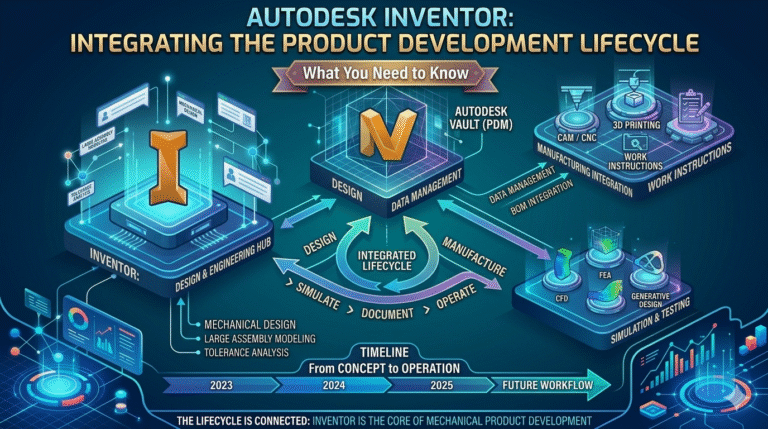
In today’s fast-paced mechanical design and manufacturing landscape, product development efficiency is no longer optional—it is a competitive necessity. Autodesk Inventor, as a professional-grade 3D mechanical CAD solution, plays a central role in bridging conceptual design, detailed engineering, simulation, manufacturing preparation, and data management. The core question—how is Autodesk Inventor integrated into the product development lifecycle?—is answered by its ability to serve as the authoritative digital thread throughout the entire process, reducing data translation errors, shortening design cycles, and enabling data-driven decisions from concept to production.
Historically positioned as a parametric, feature-based solid modeling tool, Inventor has evolved into a comprehensive platform that supports the full product development lifecycle. In 2026, enhancements such as the AI Design Copilot, expanded Model-Based Definition (MBD) capabilities, tighter Inventor Nastran simulation integration, improved CAD CAM integration with Fusion 360 and CAM tools, and native connectivity to Autodesk Vault for PLM workflows make it a cornerstone for mechanical engineers and product designers facing rising complexity, compressed timelines, and increasing sustainability demands.
Authoritative industry sources consistently highlight Inventor’s strengths. Autodesk’s official documentation emphasizes that Inventor is purpose-built for the Product Design & Manufacturing Collection, providing seamless interoperability across design, simulation, and manufacturing stages [Autodesk Inventor Overview]. The 2026 release notes detail significant advancements in generative design assistance via AI, automated drawing view generation for MBD, and performance improvements in large assembly handling [Autodesk What’s New 2026]. Industry analyses from engineering.com and DEVELOP3D confirm that Inventor remains a top choice for mid-market and enterprise mechanical design due to its robust parametric modeling, simulation integration, and PLM connectivity [engineering.com; DEVELOP3D]. Manufacturing professionals on forums such as GrabCAD and LinkedIn groups report 20–40% time savings in design-to-manufacturing handoff when using Inventor with Vault and CAM extensions [GrabCAD Community]. Finally, Autodesk’s own case studies demonstrate how companies reduce physical prototyping costs by up to 50% through early-stage Inventor Nastran simulation and digital validation [Autodesk Customer Stories].
As mechanical engineers and product designers in Dubai and across the GCC region increasingly adopt digital-first strategies to meet ambitious project deadlines and quality standards, understanding Autodesk Inventor 2026 product development workflow becomes essential. This comprehensive guide explores how Inventor integrates across every phase of the lifecycle—from ideation to manufacturing—while addressing common pain points such as data silos, late-stage revisions, and poor cross-team visibility. For professionals seeking to master these integrated workflows, explore specialized Autodesk Inventor training in Dubai at Orbit Training.
The product development lifecycle starts long before detailed modeling—with ideation, sketching, and early concept validation. Autodesk Inventor supports this critical phase through its intuitive sketch environment, parametric modeling foundation, and integration with conceptual tools in the Product Design & Manufacturing Collection. Engineers can rapidly create layout sketches, define design intent via parameters and iLogic rules, and explore multiple configurations without rebuilding geometry from scratch. In 2026, the introduction of AI Design Copilot features allows designers to describe functional requirements in natural language, receiving intelligent starting geometry suggestions that respect engineering constraints—dramatically reducing time-to-first-model.
This phase directly tackles common inefficiencies: excessive back-and-forth between concept artists and engineers, lost design intent during handoff, and slow iteration due to rigid modeling workflows. By embedding design rules early (via parameters, derived parts, and adaptive features), Inventor ensures downstream changes propagate intelligently, minimizing costly rework later in the lifecycle.
| Tool/Feature | Purpose in Conceptual Phase | Primary Efficiency Gain |
|---|---|---|
| AI Design Copilot | Generate starting geometry from text | 50–70% faster concept initiation |
| iLogic Rules | Automate design intent capture | Eliminates manual reconfiguration |
| Frame Generator | Rapid structural skeleton creation | Hours saved on layout |
| Derived Parts | Reuse and adapt early concepts | Reduces redundant modeling |
Once concepts are approved, the lifecycle moves into detailed engineering. Autodesk Inventor excels here with its fully parametric, history-based modeling environment that captures design intent through features, relationships, and equations. Engineers can build complex parts and large assemblies while maintaining full editability—any change to a driving parameter or sketch updates the entire model downstream. The 2026 release improves large assembly performance (faster open, compute, and save times) and introduces enhanced constraint inference, making it easier to manage thousands of components without slowdowns.
This phase addresses critical pain points: design errors propagating late, difficulty maintaining intent across revisions, and poor performance with complex assemblies. Inventor’s adaptive technology, positional representations, and level-of-detail (LOD) representations ensure smooth navigation and editing even in massive machine designs.
| Assembly Size | Traditional CAD Pain Point | Inventor 2026 Mitigation |
|---|---|---|
| 500–1,000 parts | Slow open & regenerate | Express Mode + LOD |
| 1,000–5,000 parts | Constraint solving lag | Improved solver + multi-threading |
| 5,000+ parts | Viewport freeze | Enhanced graphics + proxy models |
Early and continuous validation is critical to avoid costly physical prototypes. Inventor Nastran simulation integration embeds finite element analysis (FEA) directly inside the Inventor environment, allowing mechanical engineers to perform structural, thermal, modal, and fatigue studies without exporting geometry. In 2026, Nastran gains improved meshing automation, faster solver performance, and better result visualization—enabling designers to iterate faster and catch issues before detailed drawings or manufacturing handoff.
This integration eliminates the traditional pain points of data translation errors, version mismatches, and long learning curves associated with standalone FEA tools. Engineers can apply loads, constraints, and materials directly to the parametric model, run simulations, and automatically update design parameters based on results.
| Analysis Type | Inventor Nastran Capability | Typical Time Savings vs Standalone FEA |
|---|---|---|
| Static Stress | Embedded linear solver | 60–80% |
| Modal/Frequency | Direct assembly analysis | 50–70% |
| Nonlinear | Advanced material models | 40–60% |
Model Based Definition Inventor 2026 represents a major shift from 2D drawings to 3D annotated models as the single source of truth. Inventor allows engineers to embed GD&T, dimensions, notes, tables, and PMI directly on the 3D model, then publish to STEP AP242, 3D PDF, or DWG formats for downstream consumption—eliminating paper drawings and reducing interpretation errors.
The 2026 release enhances MBD with automated 3D annotation generation, improved tolerance stack-up analysis, and better export compliance with industry standards (ASME Y14.41, ISO 16792). This directly addresses pain points in manufacturing handoff: ambiguous drawings, version mismatches, and costly rework due to misinterpretation.
| Deliverable | Traditional 2D Method | Inventor MBD 2026 |
|---|---|---|
| Dimensioning | Manual drafting views | Automated 3D PMI |
| GD&T Application | Paper-based | Model-embedded & exportable |
| Downstream Use | Interpretation required | Machine-readable PMI |
CAD CAM integration Autodesk Inventor 2026 enables a continuous digital thread from design to CNC machining. Through native tools and the Product Design & Manufacturing Collection, engineers can assign manufacturing features, generate toolpaths directly from Inventor models, or seamlessly transfer associative geometry to Fusion 360 CAM or third-party CAM systems (Mastercam, HSM). In 2026, improved associative updates and feature recognition reduce programming time significantly.
This integration solves longstanding issues: lost associativity during translation, manual rework of geometry in CAM, and discrepancies between design intent and manufactured parts.
| Integration Path | Associativity Level | Typical Time Savings |
|---|---|---|
| Inventor → Fusion CAM | Full parametric link | 60–80% |
| Inventor → Mastercam | Associative via Inventor HSM | 40–60% |
| Standalone CAM | Neutral file (STEP/IGES) | Baseline |
Autodesk Vault PLM integration benefits become transformative when managing product data across the lifecycle. Vault provides revision control, check-in/check-out, automated numbering, BOM management, and release workflows—all directly from within Inventor. In 2026, Vault gains improved search, enhanced visualization, and better cloud connectivity (Vault Collaborate), making it easier for distributed teams to work concurrently without data loss or overwrite risks.
This addresses core pain points: version confusion, uncontrolled changes, lost files, and poor traceability—issues that frequently cause delays and cost overruns in engineering projects.
| Feature | Without Vault | With Vault PLM |
|---|---|---|
| Revision Control | Manual folders | Automated + traceable |
| Concurrent Editing | Risk of overwrite | Safe check-out system |
| Change Management | Emails & spreadsheets | Structured ECO process |
The Product Design & Manufacturing Collection workflow unites Inventor with Fusion 360, AutoCAD, Vault, Nastran, CAM, Factory Design Utilities, and more—creating a true digital thread from concept to shop floor. Engineers can move fluidly between tools, reuse data without translation, and maintain associativity throughout the lifecycle. In 2026, cloud collaboration, generative design extensions, and AI-assisted features further tighten this ecosystem.
This holistic approach eliminates data silos, reduces handoff errors, accelerates time-to-market, and improves quality—delivering measurable ROI for mechanical design teams.
| Collection Component | Primary Lifecycle Role | Key Integration Benefit |
|---|---|---|
| Inventor | Core mechanical CAD | Parametric design & assemblies |
| Fusion 360 | Generative & CAM | Cloud collaboration & manufacturing |
| Vault | PLM & data management | Revision & release control |
| Nastran In-CAD | Simulation & validation | Embedded FEA without translation |
Autodesk Inventor is far more than a modeling tool—it is a strategic platform deeply integrated across the entire product development lifecycle. From AI-assisted concept generation, through parametric detailed design, embedded Nastran simulation, advanced Model-Based Definition, seamless CAD CAM workflows, Vault-managed data control, and the full power of the Product Design & Manufacturing Collection, Inventor delivers the digital thread that modern mechanical engineering demands. By eliminating silos, reducing errors, accelerating iteration, and enabling data-driven decisions, it empowers engineers to achieve greater efficiency, quality, and innovation. For professionals in Dubai and the GCC looking to master these integrated workflows, Autodesk Inventor training in Dubai at Orbit Training provides the hands-on expertise needed to implement these best practices and drive real business value in 2026 and beyond.