
BIM Coordinator vs BIM Manager: Dubai Career Guide
Confused between BIM Coordinator and BIM Manager roles in Dubai? Learn the key differences, responsibilities, and career path in the UAE AEC industry.
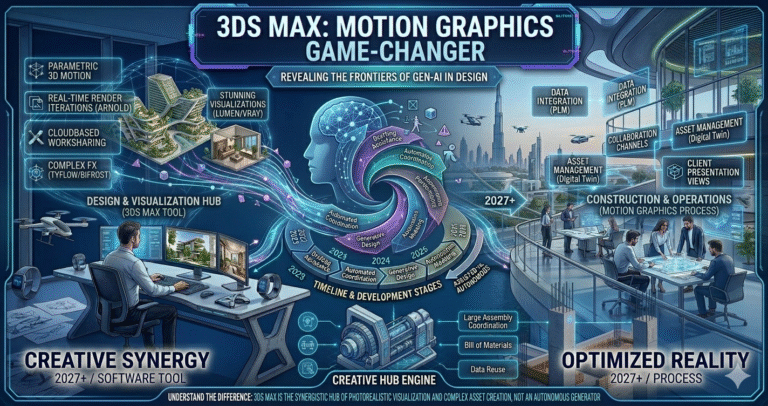
In the ever-evolving world of digital artistry, staying ahead of the curve is essential for motion graphics designers striving to produce high-impact visual content. As we move through 2026, the industry is buzzing with excitement over tools that truly revolutionize creative workflows. Among these, 3ds Max for motion graphics stands out as a pivotal platform, redefining how artists approach dynamic visuals, broadcast design, title sequences, explainer animations, VFX integration, and abstract motion work.
Imagine transforming abstract concepts into stunningly realistic—or deliberately stylized—animations and effects with unparalleled control and speed. This is the promise of 3ds Max in 2026: a mature, battle-tested toolset enhanced with modern GPU acceleration, real-time viewports, advanced particle & simulation systems, and deep integration into today’s hybrid pipelines. What makes 3ds Max such a game-changer? Beyond its robust feature set, it provides an artist-friendly workflow that lets creators spend more time designing and less time fighting the software. With 2026 updates focused on viewport performance, proceduralism, and renderer interoperability, 3ds Max has solidified its position as a must-have for serious motion designers.
Motion graphics has traveled a long path—from the analog optical printers and rostrum cameras of the 1960s–70s, through early digital compositing in the 1990s (After Effects 1.0 in 1993), to the GPU-accelerated, 3D-integrated era of today. Early 2000s saw After Effects + Cinema 4D Lite become the default combo for broadcast and explainer work, while high-end VFX studios relied on Maya, Houdini, and 3ds Max for complex motion design sequences.
By 2010–2015, real-time GPU viewports (NVIDIA CUDA/RTX) and physically-based rendering began changing expectations. The 2020s brought massive leaps:
Yet 3ds Max quietly strengthened its motion graphics position through consistent yearly updates: improved Particle Flow (later replaced by tyFlow compatibility), Arnold GPU rendering, USD interoperability, OpenPBR materials (2025–2026), massively faster Booleans/Array modifiers, interactive retopology, and viewport performance that rivals real-time engines. In 2026, 3ds Max combines decades of modeling precision with modern motion graphics needs—procedural animation, scattering, fracturing, dynamics, and real-time feedback—making it a serious contender against more “motion-first” tools. Its strength lies in handling both high-poly hero assets and procedural motion systems within the same environment, a rare capability in 2026.
Autodesk 3ds Max is a full-spectrum 3D creation suite used for modeling, animation, rigging, simulation, rendering, and compositing. While historically known for architectural visualization, game assets, and film VFX, it has quietly become one of the most powerful motion graphics platforms—especially for designers who need deep procedural control, complex simulations, and production-grade rendering in one package.
Key strengths for motion design in 2026:
Unlike After Effects (layer-based) or Cinema 4D (MoGraph-centric), 3ds Max excels when projects require true 3D dynamics, fracturing, crowd simulation, fluid effects, or high-fidelity product animation that must integrate into broadcast or cinematic pipelines. In 2026, with GPU viewport performance rivaling game engines and Arnold’s real-time denoising, 3ds Max has become a legitimate motion graphics powerhouse—especially for studios that already own Autodesk subscriptions or need one tool for modeling, animation, and final look development.
3ds Max delivers a feature set tailored for motion design complexity:
| Feature | Motion Graphics Benefit (2026) |
|---|---|
| Modifier Stack | Non-destructive procedural animation & deformation chains |
| tyFlow / Particle Flow | Industry-leading particle, fracturing, crowd, cloth & fluid sims |
| Arnold GPU Renderer | Fast, accurate motion blur, depth of field, AOVs for comp |
| Real-time Viewport | PBR materials, camera DOF/motion blur, interactive playback |
| USD Stage & OpenUSD | Interoperability with Unreal, Houdini, Maya, After Effects |
| Retopology + Conform | Quick clean-up of animated meshes & surface tracking |
| MAXScript / Python | Custom tools, procedural generators, pipeline automation |
| Array + Conform Modifiers | 40–60% faster in 2026 → instant motion arrays & surface placement |
These features allow motion designers to build complex, data-driven animations (data viz, infographics, product reveals) while maintaining full artistic control—making 3ds Max uniquely powerful in 2026.
Autodesk’s 2026 release cycle brought targeted improvements for motion graphics:
These updates directly address motion designers’ pain points: slow previews, inconsistent looks across tools, and time lost rebuilding geometry. In 2026, 3ds Max feels more responsive and production-ready than ever for broadcast, advertising, and cinematic motion graphics.
Motion design is deadline-driven—clients change direction, revisions pile up, render times matter. An unintuitive interface kills momentum. 3ds Max’s interface, while dense, rewards mastery with unmatched depth:
Once learned, the workflow is extremely efficient—especially for artists who build procedural rigs, animate thousands of elements, or manage complex simulations. In 2026, the real-time viewport and faster modifier evaluation make iteration feel almost as fluid as Cinema 4D or Houdini—without sacrificing depth. For teams that already use Revit, Maya, or Flame, the shared Autodesk UI logic reduces onboarding time significantly.
Particles are the backbone of modern motion graphics—abstract transitions, data-driven infographics, product explosions, crowd sims, fluid logos. 3ds Max offers two world-class paths in 2026:
tyFlow’s integration is now seamless—2026 updates improved viewport performance and Arnold compatibility. Designers can create:
Combined with modifiers (Array, Conform, Surface Deform), tyFlow gives motion artists Houdini-level proceduralism inside a familiar DCC—without leaving the 3ds Max ecosystem. This single-app power is a major reason 3ds Max is gaining motion graphics market share in 2026.
Modern motion pipelines are multi-tool. 3ds Max excels at interoperability in 2026:
| Software | Integration Method | Use Case |
|---|---|---|
| After Effects | USD/glTF export + Element 3D / Cineware | Final comp & text animation |
| Unreal Engine 5 | USD Stage & Datasmith | Real-time cinematic sequences |
| Houdini | USD import/export | Complex sim handoff |
| Maya | USD & FBX | Character animation integration |
| DaVinci Resolve | Arnold EXR + OpenColorIO | Color grading & finishing |
This flexibility lets studios use 3ds Max for heavy procedural animation and simulation, then hand off assets seamlessly—reducing rework and preserving creative intent across the pipeline.
3ds Max fundamentally changes how motion designers work in 2026:
Teams report 30–60% faster turnaround on complex motion projects, higher-quality client revisions, and the ability to take on work previously outsourced to VFX houses. For freelancers, 3ds Max becomes a one-stop creative powerhouse.
3ds Max bridges imagination and realism through:
Designers can start abstract, then layer realism—turning simple spline animations into photoreal product reveals or surreal data visualizations with physical grounding. This spectrum—from clean broadcast design to cinematic VFX—makes 3ds Max uniquely versatile in 2026.
In 2026, 3ds Max is not just keeping pace—it is redefining motion graphics. With GPU-powered viewports, production-grade Arnold rendering, industry-leading particle tools via tyFlow, deep proceduralism, and seamless interoperability, it offers unmatched creative freedom and production efficiency. Whether crafting broadcast opens, explainer animations, product visualizations, or experimental title sequences, 3ds Max empowers artists to realize their boldest visions faster and with greater fidelity than ever before. The future of visual storytelling belongs to those who master tools that blend artistic intuition with technical depth—3ds Max stands firmly at the forefront. For more Information you can check out our https://orbittraining.ae/courses/3ds-max-training-course-in-dubai/
Confused between BIM Coordinator and BIM Manager roles in Dubai? Learn the key differences, responsibilities, and career path in the UAE AEC industry.
Compare Revit MEP vs AutoCAD MEP for Dubai projects: features, workflows, BIM vs CAD, and how to choose the right tool for your career.
Learn Python for beginners with simple automation tasks. Find install steps, tutorials, and training options in Dubai, onsite or online.