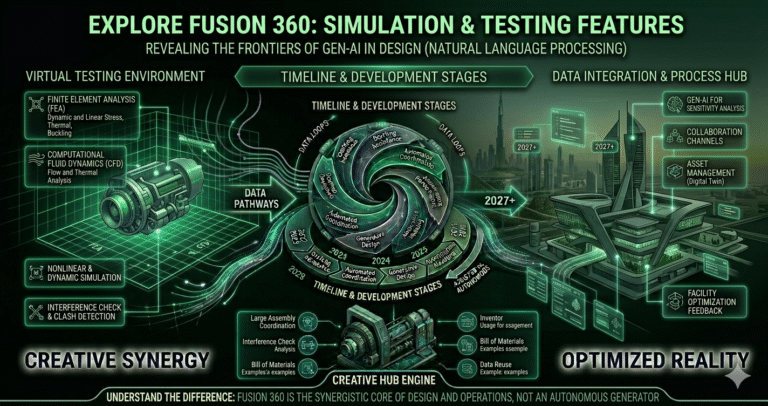
In the ever-evolving world of design and engineering, the need for robust simulation tools has never been more evident. Whether you’re a seasoned engineer or an aspiring designer, understanding how your creations will perform in real-world conditions is crucial. Enter Fusion 360, a powerful ally in the realm of computer-aided design that not only allows you to conceptualize but also test your designs with precision.
But what simulation and testing features are included in Fusion 360? The answer might just redefine the way you approach product development. Imagine sculpting a digital masterpiece and being able to predict its behavior under stress, heat, or even fluid dynamics. With Fusion 360, this isn’t just a possibility; it’s a reality. This software integrates cutting-edge simulation capabilities that empower you to foresee potential issues before they arise. By utilizing these features, you can save time, reduce costs, and push creative boundaries further than ever before. Let’s delve into the suite of simulation tools that make Fusion 360 a game-changer in product design and testing.
Understanding Simulation in Fusion 360
Fusion 360’s simulation environment is cloud-based, tightly integrated with its parametric CAD modeling, and designed for accessibility across mechanical, product, industrial, and furniture designers. In 2026, simulation is included in most commercial subscriptions (Fusion 360, Fusion Team + extensions) and runs on Autodesk’s secure cloud solvers—freeing users from expensive local hardware while delivering scalable compute power.
Core simulation philosophy:
- Seamless CAD-to-simulation workflow — no export/import steps
- Parametric associativity — geometry changes automatically update studies
- Cloud solving — unlimited parallel solves (subject to fair-use limits)
- Multiple study types in one environment — structural, thermal, CFD, modal, fatigue, generative
- Results visualization — interactive contour plots, animations, safety factor maps
- Reporting — exportable PDF/HTML reports with images, tables & annotations
Simulation is no longer a late-stage check; it is embedded early via generative design, structural validation, and performance prediction. The 2026 release improved solver speed (up to 40% faster for many studies), added better contact detection, enhanced mesh controls, and introduced AI-assisted setup recommendations. This makes Fusion 360 one of the most approachable yet powerful simulation-integrated CAD platforms for small-to-medium teams, startups, and education—bridging the gap between concept and validated design without requiring separate expert simulation software.
Structural Analysis Features
Structural simulation in Fusion 360 covers linear static, nonlinear static, modal frequencies, buckling, and event simulation (impact/drop). These tools help predict stress, strain, displacement, factor of safety, and failure modes under various load conditions.
Key structural capabilities in 2026:
- Static stress — linear & nonlinear (large displacement, material plasticity)
- Modal frequencies — natural frequencies & mode shapes
- Buckling — critical load factors for slender structures
- Event simulation — explicit dynamics for drop, impact, crash-like events
- Automated meshing — adaptive tetrahedral or hybrid meshes
- Advanced contacts — bonded, sliding, separation, friction
- Load types — force, pressure, gravity, remote force, bearing load, prescribed displacement
- Materials library — isotropic, orthotropic, temperature-dependent properties
Results include von Mises stress, principal stresses, displacement vectors, safety factor plots, and deformation animations. Engineers use structural simulation to validate frames, brackets, enclosures, consumer products, and furniture under service loads—often catching over-design or weak spots before prototyping. In 2026, improved nonlinear convergence and GPU-accelerated pre-processing have made complex assemblies (thousands of parts) solvable in minutes to hours instead of days, making structural analysis routine rather than exceptional in Fusion workflows.
Thermal and Heat Transfer Simulation Capabilities
Fusion 360’s thermal simulation predicts temperature distribution, heat flow, and thermal stresses in steady-state and transient conditions—vital for electronics, motors, heat sinks, cookware, and injection-molded parts.
2026 thermal features include:
- Steady-state & transient heat transfer
- Conduction, convection (forced & natural), radiation
- Internal & external heat generation (power input)
- Temperature-dependent material properties
- Coupled thermal-structural analysis — predict warping & stress from heating
- Thin-wall approximation for PCBs & sheet metal
- Result types — temperature, heat flux, thermal gradient, thermal stress
Electronics designers use it to ensure components stay below safe operating temperatures; industrial designers optimize heat sinks and enclosures. Transient analysis helps understand warm-up/cool-down behavior. In 2026, faster cloud thermal solves and better convection coefficient estimation tools have made thermal studies quick enough for daily design decisions—reducing reliance on expensive physical thermal chambers in early development.
Fluid Dynamics Simulation Tools
Fusion 360 CFD (Computational Fluid Dynamics) simulates internal & external flow, pressure drop, heat transfer in fluids, and flow patterns—ideal for fans, pumps, valves, HVAC ducts, automotive aerodynamics, and consumer products (showerheads, bottles).
CFD capabilities in 2026:
- Incompressible & compressible flow
- Laminar & turbulent (k-epsilon, k-omega SST)
- Internal & external flow volumes
- Rotating regions (fans, impellers, propellers)
- Heat transfer in fluids & solids (conjugate heat transfer)
- Porous media, humidity, particle tracing
- Results — velocity vectors, pressure contours, streamlines, wall heat transfer coefficient
Setup is simplified with automatic flow volume extraction and meshing. While not as advanced as dedicated CFD packages (Fluent, STAR-CCM+), Fusion CFD is fast, accurate enough for most product design decisions, and fully integrated—no file translation. In 2026, improved solver stability and cloud compute scaling allow larger models (millions of cells) to run overnight, making CFD accessible to mechanical designers without specialized training.
Vibration and Modal Analysis Functions
Modal (frequency) analysis identifies natural frequencies and mode shapes to avoid resonance. Fusion 360 supports:
- Modal frequencies — free vibration modes
- Pre-stressed modal — frequencies after loading
- Harmonic response — forced vibration under sinusoidal loads
- Random vibration — response to PSD input (military, automotive)
Results include frequency table, mode shape animations, and participation factors. Engineers use modal analysis to tune structures (shafts, frames, consumer electronics enclosures) away from operating frequencies. In 2026, faster cloud modal solves and improved damping modeling make vibration analysis routine for consumer products and machinery—helping prevent noise, vibration, and harshness (NVH) issues before prototypes are built.
Fatigue and Durability Testing Options
Fatigue analysis predicts component life under cyclic loading. Fusion 360 fatigue tools (2026) include:
- Stress-life (S-N curve) & strain-life approaches
- Constant & variable amplitude loading
- Multiple load cases & duty cycles
- Safety factor & life contour plots
- Mean stress correction (Goodman, Gerber)
- Automatic fatigue material data from built-in library
Durability studies help ensure parts survive millions of cycles (hinges, brackets, consumer goods). Combined with event simulation (drop/impact), Fusion provides a complete durability picture. In 2026, improved solver efficiency allows full-assembly fatigue studies in reasonable time—critical for consumer electronics, furniture, and automotive components that must pass rigorous life-cycle testing.
Design Optimization through Simulation
Fusion 360’s generative design and simulation-driven optimization are among the strongest in class:
- Generative design — explore hundreds of manufacturing-aware shapes
- Topology optimization — remove unnecessary material while meeting load targets
- Manufacturing constraints — milling, additive, die-casting, sheet metal
- Multi-objective optimization — minimize mass, maximize stiffness, control cost
- Outcome comparison — side-by-side studies with performance metrics
Users define preserved geometry, loads, manufacturing methods, and objectives—Fusion returns optimized alternatives. In 2026, generative studies run faster, support more materials, and integrate directly into parametric modeling. This capability drives lightweighting, material savings, and performance improvements—especially valuable in aerospace, automotive, consumer electronics, and sustainable product design.
Integration with CAD Modeling
Fusion 360’s greatest strength is zero-friction integration between CAD and simulation:
- Parametric associativity — change sketch → update model → re-run simulation automatically
- Single environment — no export/import between design & analysis
- Simulation studies live in the browser tree — easy to duplicate & compare
- Direct editing + parametric history — fix imported geometry then simulate
- Cloud solve queue — continue modeling while solves run in background
This tight coupling eliminates translation errors and rework. Designers iterate quickly—tweak geometry, re-solve, compare results—all in minutes. In 2026, improved cloud queuing and result caching make this workflow even smoother, enabling simulation to become a continuous part of design rather than a separate phase.
Real-Time Collaboration and Reporting
Fusion 360’s cloud architecture enables powerful collaboration features around simulation:
- Share simulation studies — team members view results without solving
- Comment on studies — pin feedback directly to result images
- Versioned studies — compare simulation results across design iterations
- Simulation reports — export PDF with setup, results, images, animations
- Live review sessions — share screen or link to review results together
Engineering managers, clients, and manufacturing partners can access results without installing software. In 2026, improved report templates and animation export make presenting simulation findings professional and compelling—accelerating approvals and stakeholder confidence.
Conclusion: Leveraging Fusion for Comprehensive Product Development
Fusion 360 in 2026 delivers one of the most complete, accessible, and cost-effective simulation suites available in an integrated CAD package. From structural and thermal validation to CFD, modal analysis, fatigue prediction, and best-in-class generative design, it empowers mechanical and product designers to validate and optimize early and often—without leaving the design environment. The cloud-based solvers, parametric associativity, real-time collaboration, and growing AI assistance remove traditional barriers to simulation adoption. Whether you’re a startup building consumer hardware, an industrial designer creating furniture, or an engineer refining machinery components, Fusion 360’s simulation capabilities help you design better products faster, cheaper, and with greater confidence. In an era where virtual-first development defines success, Fusion 360 stands as a powerful, all-in-one platform ready to take your ideas from concept to validated reality.