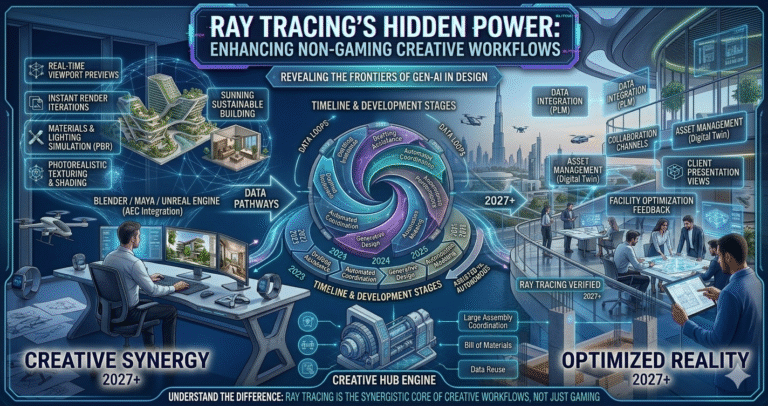
Imagine working on a detailed architectural visualization or editing a high-resolution video, and your laptop renders each reflection and shadow with astounding precision, as if you’re holding a window to a parallel reality. This isn’t science fiction—it’s the transformative influence of ray tracing technology in laptops. Traditionally celebrated in the gaming world for its ability to produce hyper-realistic graphics, ray tracing has now broken through its conventional boundaries to enhance non-gaming visual tasks.
The question we must ask is, how do laptops equipped with ray tracing capabilities elevate these non-gaming activities? In today’s fast-paced digital environment, professionals across various fields demand technology that keeps pace with their creative vision. Whether it’s animators crafting seamless scenes or architects presenting vivid, lifelike models, the need for unparalleled visual accuracy is ever-increasing. Ray tracing in laptops provides this precise level of detail, making it an indispensable tool not just for gamers but for anyone engaged in intensive visual work. By delving further into the ways this technology enriches non-gaming applications, you’ll discover how these powerful machines are pushing the boundaries of what’s visually possible.
The Evolution of Ray Tracing Technology
Ray tracing traces its roots to the 1960s in offline rendering for films (e.g., early Pixar shorts), but real-time implementation was computationally impossible until hardware acceleration. The breakthrough came with NVIDIA’s Turing architecture (RTX 20-series) in 2018, introducing dedicated RT Cores for ray-triangle intersections and BVH traversal—enabling real-time ray tracing in games.
By 2020–2022 (RTX 30-series Ampere), performance improved dramatically with second-gen RT Cores and DLSS AI upscaling/denoising. In laptops, mobile RTX GPUs brought this to portable devices, though thermal/power limits constrained full potential. The 2022–2024 Ada Lovelace (RTX 40-series) generation added third-gen RT Cores, Shader Execution Reordering, and DLSS 3 Frame Generation—making ray tracing viable in creative apps like Blender Cycles, V-Ray, Enscape, and Twinmotion.
In 2026, NVIDIA’s Blackwell (RTX 50-series mobile) GPUs represent the pinnacle: fourth-gen RT Cores for mega-geometry handling, fifth-gen Tensor Cores for advanced neural rendering/DLSS 4, and massive VRAM (up to 16–24 GB on high-end models) for complex scenes. Laptops like ASUS ROG Zephyrus G16, Lenovo Legion Pro 7i, MSI Raider, and creator-focused RTX Studio models (e.g., ASUS ProArt Studiobook) integrate these with high-refresh OLED/Mini-LED displays (often 240 Hz, 100% DCI-P3). This evolution shifted ray tracing from offline luxury to real-time essential—accelerating previews in architectural viz (Lumion, D5 Render), video editing (DaVinci Resolve GPU effects), and 3D workflows—democratizing photorealism on portable machines for professionals in 2026.
Understanding How Ray Tracing Works
Ray tracing simulates physical light behavior by tracing rays from the camera (or eye) backward to light sources, calculating interactions (reflection, refraction, absorption, scattering) at each surface. Unlike rasterization (which approximates via polygons/shaders), ray tracing computes accurate global illumination, soft shadows, caustics, and accurate reflections/refractions—producing photoreal results.
Core process:
- Primary rays from camera hit scene geometry.
- Secondary rays bounce for reflections/refractions.
- Shadow rays check light visibility.
- Recursion continues until depth limit or contribution negligible.
In laptops, NVIDIA RTX GPUs dedicate RT Cores to accelerate Bounding Volume Hierarchy (BVH) traversal and ray-triangle tests—tasks that bottleneck CPUs. Tensor Cores use AI for denoising (reducing samples needed for noise-free images) and DLSS upscaling (render low-res, upscale intelligently). In 2026 Blackwell mobile GPUs, fourth-gen RT Cores handle mega-geometry efficiently, while neural rendering enhances realism without brute force.
Creative apps leverage this: Enscape/Twinmotion for real-time arch viz walkthroughs, Blender Cycles/Redshift for GPU-accelerated final renders, DaVinci Resolve for ray-traced effects in video. Power/thermal management in laptops (via Max-Q, dynamic boost) ensures sustained performance—making ray tracing portable and practical for non-gaming pros in 2026.
Benefits of Ray Tracing for Non-Gaming Visual Tasks
Ray tracing delivers transformative advantages beyond gaming by simulating real-world light physics—elevating accuracy, speed, and immersion in creative workflows.
| Benefit | Description | Non-Gaming Impact (2026) |
|---|
| Photorealistic Lighting & Shadows | Accurate global illumination, soft shadows, caustics | Architects see true material behavior in Enscape/D5 Render previews |
| Realistic Reflections/Refractions | Mirrors, glass, water behave physically | Product designers evaluate chrome/glass in real-time; video editors add cinematic effects |
| Faster Iteration | Real-time ray-traced viewports with DLSS denoising | Reduce render waits in Blender/V-Ray; interactive client reviews |
| GPU Acceleration | RTX RT/Tensor Cores offload compute | 10–50x faster previews vs. CPU; portable high-fidelity work |
| AI Enhancements | DLSS/Neural Rendering upscale/denoise | High-res output on laptop displays without quality loss |
These benefits cut project timelines, improve decision-making, and enable previously impossible mobile workflows—essential for freelancers, architects, and VFX artists in 2026.
Enhancing Architectural Visualization with Ray Tracing
Architectural visualization (arch viz) benefits immensely from ray tracing, turning static models into immersive, photoreal experiences. In 2026, tools like Enscape, Twinmotion, D5 Render, Lumion, and V-Ray leverage RTX ray tracing for real-time walkthroughs with accurate lighting—clients see true glass reflections, soft shadows on facades, and interior global illumination without waiting hours for offline renders.
RTX 50-series laptops (e.g., Legion Pro 7i with RTX 5080/5090) handle dense BIM models (Revit imports) with mega-geometry RT Cores, enabling fluid navigation in complex urban scenes. DLSS 4 upscales previews for 4K OLED displays while maintaining 60+ fps. Benefits include:
- Immediate feedback on material/lighting choices
- Accurate daylight analysis for sustainable design
- VR/AR-ready ray-traced assets
Professionals produce marketing-grade stills/animations faster, impress clients on-site, and iterate designs confidently—ray tracing makes laptops indispensable for modern arch viz in 2026.
Elevating Video Editing Through Ray Tracing
Video editing gains cinematic quality from ray tracing in 2026. DaVinci Resolve, Adobe Premiere/After Effects (via GPU plugins), and Nuke use RTX acceleration for ray-traced effects: realistic lens flares, reflections in composites, motion-blurred shadows, and depth-of-field.
High-end laptops with RTX 5070+ GPUs render 8K timelines smoothly, applying ray-traced color grading, glows, and particle simulations in real time. Neural denoising cleans noisy footage; DLSS-like upscaling preserves detail in exports. Key elevations:
- Photoreal VFX integration without render farms
- Faster previews of complex effects layers
- Portable grading suites for on-location work
Editors achieve Hollywood-level polish on laptops—transforming post-production mobility and creativity in 2026.
Ray Tracing in Graphic Design: A Game-Changer
Graphic designers harness ray tracing for hyper-real product mockups, packaging, and digital art in tools like Adobe Substance 3D, Blender, and KeyShot. RTX GPUs render accurate metals, plastics, fabrics with subsurface scattering and caustics—essential for luxury branding or e-commerce visuals.
In 2026, laptops with RTX 50-series enable interactive material editing and 360° turntables in real time. Benefits include:
- Instant realism checks on client revisions
- High-fidelity assets for AR previews
- Reduced need for physical prototypes
Designers deliver professional-grade visuals faster, enhancing portfolios and client trust on portable setups.
Ray Tracing in Photography and Image Editing
Photographers and retouchers use ray tracing for advanced compositing and relighting in Photoshop, Lightroom, and Capture One plugins. RTX enables ray-traced shadows/reflections when inserting 3D elements into photos or simulating studio lighting virtually.
2026 laptops apply neural rendering for noise-free upscaling of RAW files and realistic bokeh simulation. Key advantages:
- Accurate light matching for composites
- Virtual product placement with photoreal shadows
- Enhanced HDR merging with ray-traced tone mapping
This elevates post-processing to new realism levels—ideal for commercial, fashion, and fine-art photographers working mobile in 2026.
The Future of Ray Tracing in Laptops for Non-Gaming Purposes
By late 2026 and beyond, ray tracing in laptops will integrate deeper with AI: neural rendering for path-traced quality at interactive rates, agentic AI optimizing scenes, and cloud-hybrid rendering for ultra-complex tasks. RTX 60-series (expected 2027+) may bring fifth-gen RT Cores and expanded VRAM—enabling full-path tracing in mobile apps like Unreal Engine 5 for arch viz or Houdini for VFX.
Trends include sustainable design analysis via ray-traced energy simulations, AR/VR authoring with real-time ray-traced previews, and seamless integration across Adobe/Autodesk suites. Laptops will become primary creative stations—democratizing high-end visuals for freelancers and studios worldwide.
Overcoming Challenges in Implementing Ray Tracing for Non-Gaming Visuals
Challenges include high power draw (impacting battery life), thermal throttling in slim laptops, software optimization gaps, and cost of RTX-equipped models. Solutions in 2026:
| Challenge | Solution |
|---|
| Thermal/Power Limits | Max-Q designs, vapor chambers, dynamic boost in RTX 50-series |
| Battery Drain | Hybrid modes (iGPU for light work), NVIDIA Advanced Optimus |
| Software Support | Studio Drivers, app updates (Enscape, Resolve native RTX) |
| Cost | Mid-range RTX 5060/5070 laptops under $2000 deliver strong performance |
With these advancements, professionals overcome barriers—making ray tracing reliable and accessible for non-gaming creative work in 2026.
Conclusion: Embracing Ray Tracing for Visual Excellence
Ray tracing in laptops has evolved from gaming novelty to creative powerhouse in 2026. By delivering photoreal lighting, reflections, and efficiency via RTX GPUs, it elevates architectural visualization, video editing, graphic design, and photography—empowering professionals to achieve desktop-level quality on the go. As hardware and software advance, ray tracing will continue redefining visual storytelling, making it an essential technology for the future of non-gaming creative work.