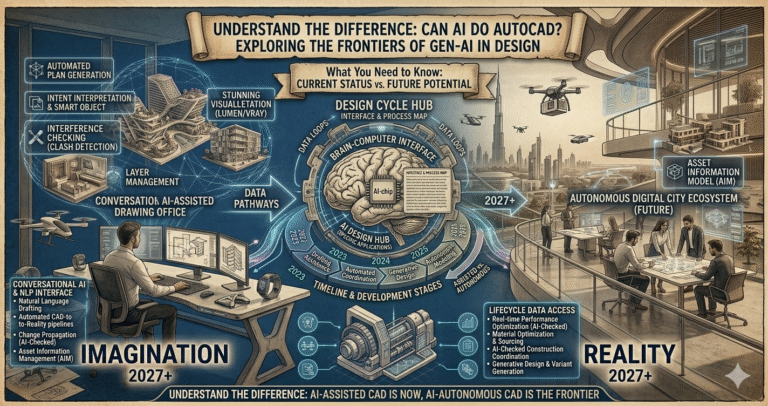
Imagine a world where the very essence of creativity and technical precision merge seamlessly through the power of artificial intelligence. As technology continues to evolve at breakneck speed, we’re standing on the precipice of a new era in design and engineering. The burning question on many minds is: can AI do AutoCAD drawings with the same finesse as a skilled human designer?
The implications are profound, hinting at a future where the boundaries of human capability and machine efficiency blur, offering architects and designers tools beyond their wildest dreams. Recent advancements in AI demonstrate incredible potential by automating tasks once thought exclusive to human intellect. Picture AI systems not only replicating AutoCAD designs but also going beyond mere replication to innovate and optimize. This transformation holds promise for industries ranging from architecture to engineering, potentially revolutionizing workflows and sparking debates on creativity and control. As we delve into the possibilities, it’s vital to understand how artificial intelligence could reshape the landscape of design and what this means for professionals reliant on such pivotal software.
Evolution of AI in Design
AI in design has progressed from basic rule-based automation in the 1990s to sophisticated machine learning models today. Early CAD tools automated hatching or dimensioning; by the 2010s, generative design emerged in tools like Autodesk Fusion. In AutoCAD, AI integration accelerated post-2020 with machine learning for pattern recognition.
By 2026, Autodesk AI powers features across products, focusing on augmentation. AutoCAD 2026 builds on 2024–2025 introductions (Markup Assist, Smart Blocks) with refinements: Detect and Convert Tech Preview uses AI to recognize repeated geometry and suggest block conversions, while Search and Convert scans for objects/text to create reusable blocks. Autodesk Assistant provides conversational support, answering queries or suggesting commands contextually.
This evolution shifts from assistive (e.g., auto-complete commands) to insightful: Activity Insights logs changes for team awareness, Macro Advisor suggests automation scripts. AI now analyzes user patterns for predictive help, reducing tedium. Third-party plugins explore generative aspects, but native AutoCAD prioritizes precision in 2D/3D drafting over full creation from text prompts. The trajectory points to hybrid human-AI workflows, where AI handles repetition and humans focus on innovation and judgment—fundamentally changing design from manual labor to strategic oversight in 2026.
Understanding AutoCAD and its Complexity
AutoCAD remains the industry benchmark for precise 2D/3D drafting since 1982. Its complexity stems from parametric commands, layers, blocks, annotations, Xrefs, and DWG format compatibility—demanding accuracy for manufacturing, architecture, and engineering.
Core elements include coordinate systems, object snaps, hatches, dimensions with tolerances, and toolsets (Architecture, Mechanical, Electrical). Handling large files requires efficient management; errors in one view propagate. In 2026, AutoCAD 2026 delivers 11x faster file opens and 4x startup, easing complexity in massive projects.
AI addresses this: Smart Blocks automate block creation from repeated elements, Markup Assist interprets feedback for edits, Autodesk Assistant troubleshoots. Yet, full drawing generation requires understanding intent, standards, codes—areas where human expertise excels. AutoCAD’s strength is controlled precision; AI augments by automating cleanup and suggestions, not replacing nuanced decision-making in complex drawings.
Current State of AI in AutoCAD Drawings
In 2026, AI in AutoCAD augments rather than autonomously generates complete drawings. Autodesk AI powers:
- Smart Blocks: Detect and Convert (Tech Preview) — AI scans drawings, recognizes repeated geometry, suggests conversions to blocks for standardization.
- Smart Blocks: Search and Convert — Searches objects/text, converts to new/existing/suggested blocks from libraries.
- Markup Import and Markup Assist — Imports PDFs/JPG/PNG markups from Autodesk Docs; AI interprets notes (e.g., “MOVE wall”) and suggests/edits actions.
- Autodesk Assistant — Conversational AI for queries, troubleshooting, command suggestions.
- Activity Insights / Macro Advisor — Tracks changes, suggests macros for repetition.
AI excels at cleanup, standardization, and support—not creating DWG from scratch (e.g., “draw a hospital floor plan”). Third-party tools like DraftAid generate 2D from 3D models, but native AutoCAD focuses on intelligent assistance. Users retain control; AI proposes, humans approve—ensuring accuracy in regulated fields.
The Role of Machine Learning in Improving AutoCAD Outputs
Machine learning (ML) trains on vast datasets to recognize patterns in drawings. In AutoCAD 2026, ML powers object detection for Smart Blocks (identifying similar geometry despite variations) and Markup Assist (interpreting handwriting/styles).
ML analyzes user behavior for predictive suggestions via Autodesk Assistant and Macro Advisor. Activity Insights uses ML to summarize changes, aiding reviews. Benefits include reduced errors in repetitive tasks, faster standardization, and contextual help—improving output quality and speed.
ML evolves outputs toward consistency and efficiency, complementing human creativity for superior results in 2026 workflows.
Advantages and Limitations of AI-Generated AutoCAD Drawings
| Aspect | Advantages | Limitations |
|---|
| Speed | Automates cleanup (Smart Blocks saves hours), quick markup incorporation | No full drawing generation; still requires human setup |
| Accuracy | Reduces manual errors in repetition/standardization | AI suggestions may miss context/nuance; requires verification |
| Creativity | Frees time for innovative design | Lacks original ideation; no true “from scratch” creativity |
| Scalability | Handles large files faster with AI insights | Tech Preview features experimental; potential inconsistencies |
Advantages dominate repetitive work; limitations highlight AI as assistant, not replacement.
Impact on Design Professionals and Industries
AI shifts roles: drafters focus on oversight/innovation, reducing tedium. Architects/engineers iterate faster; firms gain efficiency, lower costs. Industries (AEC, manufacturing) see reduced errors, faster delivery, better sustainability via optimized designs.
Professionals upskill in AI prompting/oversight; new roles emerge (AI workflow specialists). Industries benefit from hybrid workflows—human judgment + AI speed—for competitive edge in 2026.
Ethical Considerations in AI-Generated Designs
Ethics include accountability (who owns AI-suggested errors?), bias in training data (potentially reinforcing outdated standards), job displacement, and intellectual property (AI-trained on user drawings?).
Autodesk emphasizes transparency, user control, secure processing. Professionals must verify outputs for liability. Ethical use promotes augmentation, not replacement—ensuring responsible integration in design.
Training AI for Enhanced AutoCAD Outputs
Training involves feeding ML models drawing patterns, markups, user interactions. Autodesk uses anonymized data for Smart Blocks/Markup Assist. Users contribute via usage (improving suggestions).
Future: customizable models via fine-tuning on firm standards. Training enhances accuracy, personalization—elevating outputs while preserving human oversight.
Future Prospects: AI’s Potential Evolution in AutoCAD Drawings
By 2027+, expect deeper generative capabilities: text-to-DWG prompts, automated full drawings from specs, advanced predictive design. Integration with generative tools (Fusion-like) and agentic AI for end-to-end workflows.
Trends: real-time optimization, sustainability analysis, seamless 2D/3D. AI evolves as creative partner—amplifying artistry while humans guide vision and ethics.
Conclusion: The Fusion of Creativity and Technology
In 2026, AI does not fully “do” AutoCAD drawings autonomously—but powerfully augments them via Autodesk AI tools like Smart Blocks, Markup Assist, and Assistant. This fusion enhances precision, efficiency, and innovation, allowing professionals to focus on artistry. The future promises deeper integration, where AI and human creativity converge to unlock unprecedented design potential.