

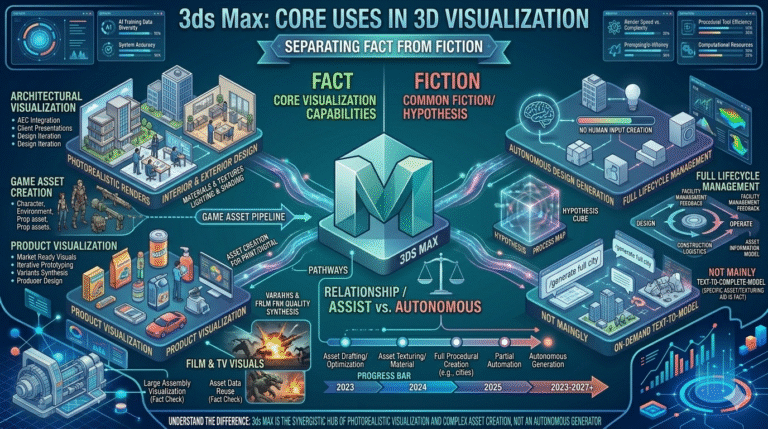
In the fast-moving world of 3D visualization, few questions spark more confusion among 3D visualizers and game artists than this: what is 3ds Max mainly used for in 3D visualization? For decades, Autodesk 3ds Max has been synonymous with high-end architectural visualization, photorealistic product rendering, cinematic animation, and broadcast-quality motion graphics. Yet myths persist—some claim it’s “only for archviz,” others insist it’s outdated compared to real-time engines like Unreal, and a growing number believe AI has already made traditional 3ds Max workflows obsolete. The reality is far more nuanced and powerful.
At its core, 3ds Max remains one of the most versatile and production-proven tools for creating photorealistic stills, animations, and immersive experiences. Its modifier stack, procedural scattering tools (Forest Pack, RailClone), advanced material system (now with OpenPBR), and tight integration with renderers like V-Ray and Arnold make it the preferred choice for professionals who demand pixel-perfect control over lighting, shading, and composition—qualities still difficult to achieve consistently in real-time engines. In 2026, 3ds Max continues to evolve with significant performance gains, AI-assisted modeling, OpenPBR standardization, and enhanced USD interoperability, ensuring it remains essential for high-end architectural visualization workflows where quality trumps speed alone.
Authoritative sources confirm its ongoing dominance. Autodesk’s official 2026 release notes highlight accelerated viewport performance, OpenPBR as default material, ReForm/Flow retopology upgrades, and USD Layer Editor improvements—directly benefiting large-scale environment modeling and archviz pipelines [Autodesk 3ds Max]. CG Channel’s coverage of 3ds Max 2026 praises its continued strength in professional visualization and VFX due to modifier depth and plugin ecosystem [CG Channel]. 80 Level reports on the growing adoption of OpenPBR across engines, with 3ds Max leading the transition for archviz artists [80.lv]. Industry surveys from DEVELOP3D and Architosh consistently rank 3ds Max among the top tools for high-end photorealistic rendering, especially when paired with V-Ray or Corona [DEVELOP3D; Architosh]. Even in game-adjacent visualization, studios use 3ds Max to author assets for Unreal Engine 5 via Datasmith—proving its role extends far beyond static images [Epic Games Datasmith]. These endorsements debunk outdated myths and highlight why 3ds Max remains indispensable for 3D visualizers seeking uncompromising quality in 2026.
For 3D visualizers and game artists in Dubai—where luxury residential towers, mega-malls, hospitality projects, and mixed-use developments demand photorealistic marketing materials and immersive walkthroughs—understanding 3ds Max’s true strengths is critical. Misconceptions can lead to inefficient tool choices, missed deadlines, and subpar deliverables. This comprehensive guide separates fact from fiction, explores 2026 features, compares workflows, and shows why 3ds Max continues to dominate high-end architectural visualization. Whether you’re battling long render times, inconsistent material looks across platforms, or the challenge of massive environment modeling, 3ds Max offers proven solutions. Master these capabilities through expert-led 3ds Max training in Dubai at Orbit Training.
At its foundation, 3ds Max is engineered for maximum creative control in photorealistic 3D visualization. Its non-destructive modifier stack allows 3D visualizers to iterate endlessly on geometry, materials, lighting, and effects without ever losing the ability to return to earlier stages. This single architectural strength alone makes it ideal for architectural visualization projects that require frequent client revisions, multiple lighting scenarios, and high-resolution output. Combined with procedural tools like RailClone and Forest Pack, 3ds Max enables the creation of vast, detail-rich environments—skyscraper exteriors, lush landscapes, intricate interiors—that remain fully editable even at millions of polygons.
In 2026, performance optimizations (faster Conform, Displacement, and Boolean modifiers) and OpenPBR standardization ensure assets look identical in downstream engines like Unreal or Unity, solving long-standing pain points in multi-platform delivery. For game artists transitioning into visualization, 3ds Max offers superior topology control and texture baking workflows compared to sculpt-focused tools. The result is a tool that excels where precision, repeatability, and quality matter most—high-end archviz, product viz, motion graphics, and cinematic pre-visualization.
Many misconceptions arise from comparing 3ds Max directly to real-time engines without recognizing their different purposes. While Unreal delivers instant feedback, 3ds Max delivers unmatched final-image fidelity and control. Professionals choose 3ds Max when the deliverable is a 4K still, 8K panorama, or 60 fps cinematic animation—not interactive walkthroughs alone. Understanding this distinction eliminates confusion and positions 3ds Max correctly as the authoring tool for premium visualization content.
| Visualization Goal | 3ds Max Strength | Typical Deliverable |
|---|---|---|
| Photoreal stills & panoramas | Renderer control + multi-pass | Marketing images, billboards |
| Cinematic animations | Animation tools + motion paths | Fly-throughs, product reveals |
| Large environments | Procedural scattering + performance | Masterplans, urban viz |
| Cross-platform assets | OpenPBR + USD/Datasmith | Game engine handoff |
The 3ds Max 2026 architectural visualization features focus on performance, interoperability, and realism—directly addressing the needs of 3D visualizers working on luxury residential, hospitality, commercial, and mixed-use projects. Key updates include accelerated viewport navigation (GPU-driven improvements), OpenPBR as default material for physically accurate shading across renderers, ReForm and Flow retopology upgrades for cleaner high-to-low poly conversion, and USD 0.10 Layer Editor for managing variants and LODs in massive scenes. These enhancements make 3ds Max faster and more reliable for creating high-end archviz content under tight deadlines.
For architects and visualizers in competitive markets like Dubai, where photoreal marketing materials must be delivered quickly, these features reduce render farm queues, simplify material matching for Unreal handoffs, and enable smoother iteration on client feedback. The combination of procedural tools and improved performance allows creation of city-scale environments with billions of polygons—previously unthinkable without massive hardware investment. OpenPBR also future-proofs assets for emerging real-time pipelines without sacrificing final-image quality.
These updates reaffirm 3ds Max’s position as the go-to tool for professionals who prioritize final output fidelity over real-time interactivity alone. Visualizers can now produce cinematic-quality animations and stills with greater speed and consistency than ever before.
| 2026 Feature | Visualization Benefit | Time / Quality Impact |
|---|---|---|
| OpenPBR Default | Consistent look across renderers & engines | Eliminates material remapping |
| ReForm/Flow Retopo | Cleaner high-to-low conversion | 50–70% faster prep |
| Viewport Acceleration | Smooth navigation in billion-poly scenes | Real-time feedback |
| USD Layer Editor | Variant & LOD management | Streamlines delivery |
The AI Animation Studio 3ds Max 2026 enhancements bring intelligent automation to animation and effects workflows, enabling 3D visualizers to create more dynamic architectural animations with less manual keyframing. Features include AI-assisted motion path generation, procedural animation tools, improved particle systems (TyFlow integration), and neural denoising for faster, cleaner motion blur and depth-of-field passes. These tools allow visualizers to add lifelike camera moves, environmental animations (wind-blown trees, water, crowds), and cinematic transitions without frame-by-frame tedium.
For architects presenting large-scale developments, this means more compelling fly-throughs and marketing animations that convey scale, atmosphere, and lifestyle—critical in competitive sales environments. AI reduces iteration time on complex effects, letting artists focus on storytelling rather than technical setup. Combined with OpenPBR and Arnold GPU rendering, animations achieve photoreal quality at reduced render times, directly improving project delivery speed and client satisfaction.
While not fully autonomous, AI Animation Studio tools represent a significant step toward intelligent, artist-directed animation—bridging the gap between static viz and immersive cinematic experiences.
| Animation Task | Traditional Time | AI-Assisted 2026 Time | Quality Gain |
|---|---|---|---|
| Camera fly-through | 4–8 hours | 1–2 hours | Smoother paths |
| Vegetation animation | Manual keyframing | Procedural + AI | Realistic motion |
| Final render denoising | Long farm times | Neural 10x faster | Cleaner output |
When evaluating the best software for high-end archviz 2026, 3ds Max consistently ranks at or near the top for professionals prioritizing final-image quality, creative control, and production reliability. While tools like Unreal Engine 5 offer real-time speed and interactivity, 3ds Max delivers superior offline rendering fidelity, material accuracy, and post-production flexibility—qualities essential for print campaigns, large-format displays, and cinematic marketing videos. Its modifier stack, procedural ecosystem, and renderer integrations (V-Ray, Corona, Arnold) remain unmatched for creating pixel-perfect visualizations of luxury residences, hotels, and commercial developments.
In competitive markets like Dubai, where photorealistic marketing materials directly influence sales, 3ds Max’s ability to produce flawless 8K stills, 360° panoramas, and broadcast-quality animations gives visualizers a decisive edge. OpenPBR and USD support also ensure assets remain future-proof for hybrid pipelines. While real-time engines gain ground for immersive experiences, 3ds Max holds its position as the authoring tool of choice for premium static and animated content.
| Software | Primary Strength 2026 | Best For | Weakness vs 3ds Max |
|---|---|---|---|
| 3ds Max | Offline photoreal quality + control | High-end stills & cinematics | — |
| Unreal Engine 5 | Real-time interactivity & speed | VR/AR walkthroughs | Lower final-image fidelity |
| Blender | Free + growing ecosystem | Indie & mid-tier viz | Less plugin depth |
| Cinema 4D | Motion graphics & ease of use | Broadcast viz | Weaker large-scale environments |
The debate 3ds Max vs Unreal Engine for visualization often overlooks their complementary roles. 3ds Max excels as the high-fidelity authoring tool for creating assets and scenes with pixel-perfect control, while Unreal Engine 5 serves as the real-time delivery platform for interactive experiences. Visualizers typically author in 3ds Max (geometry, materials, lighting setups), then export via Datasmith or USD for real-time viewing in Unreal—combining the best of both worlds: uncompromising quality from Max and instant feedback from UE5.
In 2026, OpenPBR standardization and improved Datasmith support make this handoff smoother than ever, reducing material mismatches and rework. For Dubai-based firms delivering both marketing stills and VR walkthroughs, this hybrid workflow maximizes efficiency and client impact without forcing an either/or choice.
| Requirement | Best Tool 2026 | Reason |
|---|---|---|
| Pixel-perfect stills | 3ds Max | Renderer control + multi-pass |
| Interactive walkthroughs | Unreal Engine 5 | Real-time Lumen/Nanite |
| Asset authoring | 3ds Max | Procedural + topology tools |
| Hybrid delivery | Both via Datasmith/USD | Best of both worlds |
The OpenPBR 3ds Max 2026 workflow introduces a physically-based material standard that ensures consistent appearance across renderers (V-Ray, Corona, Arnold) and real-time engines (Unreal, Unity). By adopting OpenPBR as default, 3ds Max eliminates the traditional pain point of remapping materials when moving assets between tools—critical for visualizers delivering both offline renders and interactive experiences from the same scene.
OpenPBR supports layered materials, clearcoat, thin-film, subsurface scattering, and anisotropy, enabling photorealistic representation of metals, glass, fabrics, and complex finishes common in luxury architectural visualization. For Dubai projects featuring marble, glass façades, and metallic accents, OpenPBR delivers accurate reflections and refractions without custom hacks. Combined with neural denoising and GPU rendering, visualizers achieve final-quality previews faster, shortening approval cycles and reducing overall project costs.
| Material Type | OpenPBR Advantage | Visualization Benefit |
|---|---|---|
| Metals | Anisotropy + clearcoat | Realistic brushed & polished |
| Glass | Thin-film + IOR | Accurate reflections/refractions |
| Fabrics | Subsurface + velvet | Lifelike upholstery & curtains |
| Marble/Stone | SSS + displacement | Convincing luxury surfaces |
Photorealistic rendering 3ds Max 2026 reaches new heights thanks to OpenPBR standardization, neural denoising, GPU acceleration in Arnold, and enhanced integration with V-Ray and Corona. Visualizers can now produce images that rival photographs in quality—critical for selling multi-million-dirham properties in Dubai’s luxury market. Features like adaptive sampling, AI denoising, and real-time viewport ray tracing provide instant feedback, allowing rapid iteration on lighting, materials, and composition.
These advancements solve longstanding challenges: long render times that delay client approvals, inconsistent results across renderers, and difficulty achieving believable global illumination in complex interiors. With GPU rendering and denoising, final frames that once took hours now complete in minutes, dramatically improving turnaround and profitability. Combined with procedural scattering and high-resolution output, 3ds Max delivers cinematic-quality visualizations that stand out in competitive presentations.
| Renderer | Key 2026 Strength | Best Use in Archviz |
|---|---|---|
| V-Ray | Realistic GI & materials | Interiors & exteriors |
| Corona | Fast interactive rendering | Quick client previews |
| Arnold | GPU acceleration + OpenPBR | Cinematic animations |
3ds Max remains one of the most powerful and versatile tools for 3D visualization in 2026, excelling in photorealistic rendering, large-scale environment modeling, cinematic animation, and high-end architectural visualization. Far from being limited to “just archviz,” its modifier stack, procedural ecosystem, OpenPBR standardization, AI-assisted features, and seamless engine interoperability make it the authoring tool of choice for professionals who demand final-image quality and creative control. Myths about obsolescence or real-time replacement overlook its unique strengths: precision, flexibility, and proven results in premium marketing and presentation work.
For 3D visualizers and game artists in Dubai and the GCC—where stunning visuals drive sales in luxury real estate, hospitality, and mixed-use developments—mastering 3ds Max in 2026 means staying competitive in a quality-driven market. Whether creating 8K stills, immersive animations, or assets for real-time delivery, 3ds Max delivers unmatched fidelity and efficiency. To unlock its full potential, explore specialized 3ds Max training in Dubai at Orbit Training and elevate your visualization pipeline to the next level.