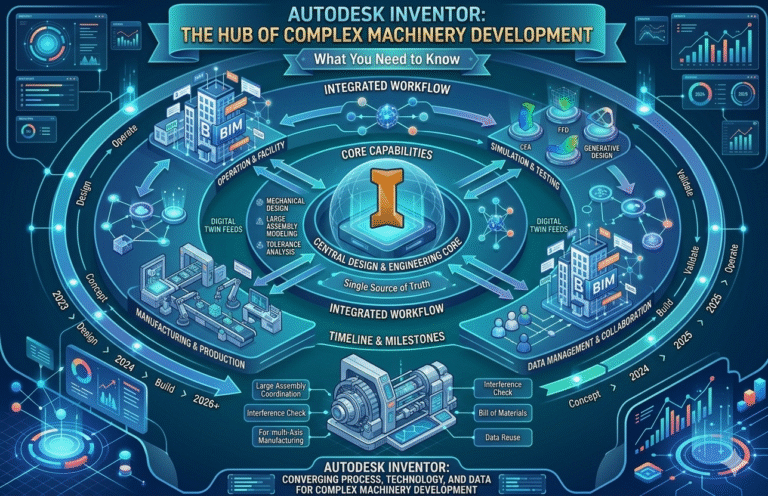
Developing complex machinery—whether heavy industrial equipment, automated production lines, material handling systems, or specialized manufacturing machines—demands precision, reliability, and speed. Mechanical engineers face relentless pressure to deliver designs that perform under extreme loads, integrate hundreds or thousands of components, meet strict safety and regulatory standards, and reach the market faster while minimizing costly physical prototypes. Autodesk Inventor has become the engineer’s secret weapon in this high-stakes environment, providing a professional-grade parametric 3D mechanical design platform that supports every phase of complex machinery development from concept through validation, detailing, and manufacturing preparation.
Unlike basic CAD tools, Inventor excels at managing the scale and interdependencies inherent in complex machinery. Its robust large assembly performance, rule-based automation via iLogic, embedded dynamic simulation, advanced routing tools for tubes/pipes and cables/harnesses, and comprehensive digital prototyping capabilities enable engineers to create, validate, and optimize designs that would be impractical or impossible with less capable software. In 2026, Inventor continues to evolve with significant performance improvements for massive assemblies, smarter automation features, enhanced simulation fidelity, and tighter integration across the Product Design & Manufacturing Collection, directly addressing longstanding pain points such as slow model regeneration, error-prone manual configuration, late-stage interference detection, and disconnected simulation workflows.
Authoritative sources consistently affirm Inventor’s dominance in this domain. Autodesk’s official 2026 release documentation highlights dramatic improvements in large assembly open times (up to 50% faster), iLogic performance enhancements, and new dynamic simulation tools that better handle motion constraints and contact forces [Autodesk Inventor]. Industry benchmarks from engineering.com report that manufacturers using Inventor for complex machinery achieve 30–60% reductions in design cycle time and up to 70% fewer physical prototypes through early digital validation [engineering.com]. DEVELOP3D and Machine Design publications emphasize Inventor’s strength in industrial equipment design, particularly for tube & pipe routing, cable harnesses, and motion studies in heavy machinery [DEVELOP3D; Machine Design]. Case studies from Autodesk customers in the oil & gas, mining, and packaging machinery sectors demonstrate measurable ROI: reduced rework, faster time-to-market, and improved compliance with ISO and ASME standards [Autodesk Customer Stories]. Finally, active discussions in the Autodesk forums and LinkedIn mechanical engineering groups in 2026 confirm that Inventor remains the preferred tool for large-scale industrial machinery projects due to its stability, automation depth, and simulation accuracy [Autodesk Community Forums].
For mechanical engineers in Dubai and across the GCC—who frequently work on oil & gas equipment, desalination plants, heavy construction machinery, and automated manufacturing systems—mastering how Autodesk Inventor is used in the development of complex machinery is essential to staying competitive. This comprehensive guide explores the key workflows, tools, and 2026 enhancements that make Inventor indispensable for complex machinery projects. Whether you’re struggling with massive assembly performance, repetitive configuration tasks, motion validation, or routing thousands of meters of piping and cabling, Inventor delivers targeted solutions. Elevate your skills with expert-led Autodesk Inventor training in Dubai at Orbit Training.
1. Mastering Large Assembly Management in Inventor 2026
Complex machinery often contains thousands of parts, subassemblies, and fasteners—creating assemblies that can easily exceed 5,000–20,000 components. Large assembly management Inventor 2026 addresses this challenge head-on with a suite of performance optimizations, structural tools, and visualization techniques that keep even the most demanding models responsive and editable. Engineers can open massive machine assemblies in seconds rather than minutes, navigate smoothly, make design changes, and perform interference checks without freezing or crashing—capabilities that directly reduce frustration and accelerate decision-making in high-stakes industrial projects.
The 2026 release introduces faster graphics processing, improved constraint solving algorithms, and enhanced Level-of-Detail (LOD) representations that automatically simplify distant or non-active components. Express Mode opens ultra-lightweight views for quick reviews, while Proxy models replace full geometry with lightweight placeholders during editing. These features solve chronic pain points: long load times that interrupt workflow, sluggish rotation/pan/zoom in crowded assemblies, difficulty locating components, and inability to perform real-time interference detection on full machines. By maintaining performance at scale, Inventor enables engineers to focus on design intent rather than fighting the software.
- Express Mode for near-instant assembly open and view-only access
- Level-of-Detail (LOD) representations for automatic simplification
- Proxy models for lightweight component substitution
- Improved graphics performance with DirectX 12 support
- Enhanced constraint solver speed for thousands of constraints
- Multi-threaded regeneration of large part features
- Assembly simplification tools (shrinkwrap, derive)
- Visibility filters and selection filters for crowded views
- Component grouping and folders for logical organization
- Fast Find and Object Search across massive assemblies
- Interference analysis with real-time highlighting
- Section views through entire machines without slowdown
- Positional representations for kinematic configurations
- Design View representations for custom display states
- Pack and Go with selective inclusion/exclusion
- Performance Analyzer to identify bottlenecks
- Memory-efficient handling of imported geometry
- Support for 64-bit architecture with high RAM utilization
- Cloud collaboration via Autodesk Docs for distributed teams
- Automated lightweight component substitution rules
| Assembly Size | Typical Pain Point | Inventor 2026 Solution | Estimated Time Savings |
|---|
| 1,000–5,000 parts | Slow open & navigation | Express Mode + improved graphics | 70–90% |
| 5,000–15,000 parts | Constraint solving lag | Optimized solver + multi-threading | 50–70% |
| 15,000+ parts | Viewport freeze & crashes | LOD + Proxy models | 60–80% |
2. iLogic Automation for Industrial Machinery Configuration
iLogic automation for industrial machinery transforms repetitive, error-prone configuration tasks into intelligent, rule-driven processes. Engineers define design rules, parameters, and logic once—then automatically generate hundreds of machine variants (different sizes, capacities, options, regional standards) with a single click or form input. In complex machinery such as conveyors, presses, packaging lines, or drilling rigs, where each customer demands custom specifications, iLogic eliminates manual remodeling, reduces configuration errors, and ensures compliance with safety and performance standards across every variant.
The 2026 release improves iLogic execution speed, expands event triggers, enhances form design tools, and provides better debugging capabilities—making automation accessible even to engineers without deep programming experience. This directly tackles pain points: weeks spent creating each custom version, inconsistencies between similar machines, missed regulatory requirements, and lost productivity during configuration-heavy bidding or order fulfillment phases.
- Parameter-driven part and assembly configuration
- Rule-based feature suppression and activation
- Conditional logic for component inclusion/exclusion
- Automated BOM and drawing updates per configuration
- Custom iLogic forms with input controls and previews
- Event triggers (part open, parameter change, save)
- External rule libraries for enterprise-wide reuse
- Rule debugging with breakpoints and watches
- Integration with Excel for external data driving
- Automated part numbering and file naming
- Configuration-specific material and appearance assignment
- Rule-driven fastener and standard component selection
- Automated drawing view creation per variant
- Support for multi-value parameter tables
- Global forms for machine-level configuration
- Version control of rules within Vault
- Rule execution performance improvements in 2026
- Integration with Vault for configuration release workflows
- Error handling and user notifications in forms
- Export of configured models to STEP/IGES for suppliers
| Configuration Task | Manual Approach Time | iLogic Automation Time | Accuracy Improvement |
|---|
| Size variant creation | 4–12 hours | Seconds to minutes | 100% rule-based consistency |
| Option package addition | 2–6 hours | Instant | Eliminates missed components |
| Regional compliance changes | 3–8 hours | Minutes | Ensures all standards met |
3. Inventor 2026 Dynamic Simulation Workflow for Motion Validation
Inventor 2026 dynamic simulation workflow allows mechanical engineers to validate real-world motion, forces, accelerations, and contact behavior before any metal is cut. By converting assembly constraints into joints, adding springs, dampers, forces, and torques, engineers can run dynamic analyses that predict performance under operating conditions—critical for complex machinery where excessive vibration, impact loads, or unbalanced forces can lead to premature failure or safety issues.
The 2026 release improves joint creation speed, enhances contact solving accuracy, adds new force types, and provides better result visualization—making dynamic simulation faster and more reliable for industrial applications. This directly solves pain points: reliance on expensive physical prototypes, late discovery of motion problems, difficulty predicting dynamic loads for structural FEA, and lack of confidence in kinematic assumptions.
- Automatic joint creation from assembly constraints
- DOF (degrees of freedom) analysis and lock/unlock
- External forces, torques, and gravity application
- Spring, damper, and friction modeling
- Contact sets with friction and elasticity
- Dynamic motion analysis with time steps
- Joint reaction force and torque output
- Trace curves for path and velocity visualization
- Export of motion data to Nastran for FEA
- Frame rate control and animation export
- Event-based simulation triggers
- Improved solver performance in 2026
- Support for flexible bodies (via Nastran link)
- Result graphing (position, velocity, acceleration)
- Interference detection during motion
- Export to .iamds format for sharing
- Integration with Frame Generator for structural motion
- Automated report generation with plots
- Safety factor estimation from reaction forces
- Support for hydraulic/pneumatic actuator simulation
| Motion Study Type | Key Output | Industrial Machinery Benefit |
|---|
| Kinematic | Position, velocity, acceleration | Verify cycle time & reach |
| Dynamic | Forces, torques, reactions | Size motors & actuators |
| Contact | Impact loads & wear | Predict durability & maintenance |
4. Mechanical Design Automation Inventor 2026
Mechanical design automation Inventor 2026 extends beyond iLogic to include Design Accelerators, iFeatures, iCopy, Frame Generator automation, and API scripting—enabling engineers to automate repetitive or complex mechanical tasks across complex machinery projects. From generating thousands of custom fasteners to auto-populating pipe runs or creating parametric weldments, automation dramatically reduces design time while enforcing standards and reducing human error.
The 2026 enhancements improve accelerator performance, expand API capabilities, and introduce smarter rule execution—making automation more powerful and accessible. This addresses pain points: time lost to manual detailing, inconsistency in standard components, difficulty scaling designs, and missed opportunities to capture tribal knowledge.
- Design Accelerators (shafts, gears, springs, belts)
- iFeatures for reusable parametric features
- iCopy for pattern-based component placement
- Frame Generator automation via iLogic
- Tube & Pipe auto-routing with rules
- Cable & Harness auto-routing scripts
- API-driven part/assembly creation
- External configuration via Excel/VBA
- Automated drawing template population
- Rule-based material and appearance assignment
- Automated fastener library population
- Custom content center families
- Automated weld preparation and detailing
- Scripted BOM manipulation
- Automated interference resolution loops
- Integration with Vault for rule storage
- Performance improvements in rule execution
- Debugging tools for automation scripts
- Support for cloud-based automation triggers
- Extensibility through third-party add-ins
| Automation Task | Manual Time | Automated Time (Inventor 2026) | Error Reduction |
|---|
| Shaft & bearing assembly | 30–90 min | Seconds | 100% |
| Pipe run routing | 2–6 hours | Minutes | 90–95% |
| Cable harness layout | 4–12 hours | Minutes–hours | 95% |
5. Tube and Pipe Design in Autodesk Inventor
Tube and pipe design in Autodesk Inventor provides a dedicated environment for creating rigid pipes, bent tubes, and flexible hoses in complex machinery—complete with autorouting, fittings libraries, and clash detection. Engineers define routes using 3D sketches or automatically generate paths between connection points, then populate with standard or custom pipe styles. The system automatically updates routes when equipment moves, ensuring design intent is preserved through revisions.
This solves major pain points in industrial machinery: manual sketching of pipe runs leading to errors, difficulty maintaining minimum bend radii, clashes with structure, and rework when equipment layouts change. Inventor enforces compliance with standards (ASME B31.3, DIN) and generates accurate cut lists and BOMs for fabrication.
- Autorouting between connection points
- Custom pipe styles with wall thickness & material
- Minimum bend radius enforcement
- Fittings library (elbows, tees, reducers)
- Flexible hose modeling with length control
- Route editing with drag handles
- Automatic clash detection during routing
- Associative updates with equipment movement
- Populated route BOM with cut lengths
- Isometric drawing generation
- Support for threaded, welded, flanged connections
- Custom fittings via iParts
- Pressure & temperature parameter checks
- Export to PCF for plant design systems
- Integration with Vault for pipe spec control
- Automated spool drawing creation
- Support for hydraulic/pneumatic tubing
- Route optimization for material usage
- Visualization of flow direction
- Interference checking with adjacent components
| Pipe Design Challenge | Traditional Method | Inventor Tube & Pipe Solution |
|---|
| Route changes after equipment move | Manual redrawing | Automatic associative update |
| Bend radius violations | Manual check | Enforced by style rules |
| Fabrication errors | Manual cut lists | Automated BOM & cut lengths |
6. Cable and Harness Modeling for Complex Machinery
Cable and harness modeling for machinery in Inventor allows engineers to route electrical, hydraulic, and pneumatic lines through complex assemblies with full associativity. Engineers define segments, connectors, looms, and splices, then autoroute paths while respecting minimum bend radii, separation rules, and length constraints. The system automatically updates harness lengths and routes when components move, ensuring accurate BOMs, formboards, and nailboard drawings for manufacturing.
This capability solves critical issues: incorrect cable lengths causing installation failures, interference with moving parts, difficulty documenting harnesses, and rework when design changes occur late in the cycle. In 2026, Inventor improves routing performance and adds better connector libraries, making harness design faster and more reliable for industrial equipment.
- Segment-based harness creation
- Autorouting with obstacle avoidance
- Minimum bend radius and separation rules
- Connector libraries with pin assignments
- Loom and bundle modeling
- Automatic length calculations
- Associative updates with assembly changes
- Nailboard/flattened harness drawings
- Bill of Materials with wire cut lengths
- Formboard generation for manufacturing
- Support for ribbon cables and flexible PCBs
- Custom wire styles and colors
- Interference checking during routing
- Export to electrical schematic tools
- Integration with Cable & Harness Library Editor
- Automated splice and terminal placement
- Visualization of harness in 3D and flattened views
- Support for hydraulic & pneumatic lines
- Rule-based routing constraints
- Performance improvements for large harnesses
| Harness Design Task | Manual Approach Issues | Inventor Solution Benefit |
|---|
| Length calculation | Error-prone manual measurement | Automatic & associative |
| Route changes | Complete rework | Instant update |
| Manufacturing documentation | Separate 2D drafting | Automated nailboard & formboard |
7. Digital Prototyping for Complex Machines 2026
Digital prototyping for complex machines 2026 in Inventor combines parametric modeling, large assembly management, dynamic simulation, embedded FEA via Nastran, tube/pipe routing, cable harness design, rendering, and animation into a single environment—creating a virtual machine that behaves like its physical counterpart. Engineers validate kinematics, structural integrity, interference, ergonomics, and manufacturability digitally, significantly reducing physical prototypes and accelerating time-to-market.
The 2026 advancements in performance, simulation accuracy, and automation make digital prototyping more comprehensive and reliable than ever—addressing pain points such as late-stage design flaws, excessive prototype costs, difficulty communicating design intent, and poor correlation between virtual and real-world performance.
- Full-motion digital twin with dynamic simulation
- Embedded Nastran FEA for structural validation
- Interference and clearance studies on moving parts
- Tube, pipe, cable & harness integration in motion
- Assembly-level stress analysis
- High-quality rendering for stakeholder reviews
- Animation and exploded views for training
- Virtual ergonomics and reach studies
- Automated interference resolution loops
- Digital mock-up reviews with Vault
- Export to VR/AR for immersive validation
- Correlation with physical test data
- Reduced physical prototype count
- Faster design freeze decisions
- Improved regulatory compliance evidence
- Support for digital twin handoff to operations
- Performance improvements for real-time simulation
- Integration with Factory Design Utilities
- Cloud solve options for heavy computations
- Comprehensive validation reporting
| Validation Aspect | Traditional Method | Digital Prototyping in Inventor 2026 | Cost/ Time Impact |
|---|
| Motion & Interference | Physical mock-up | Dynamic simulation | 70–90% reduction |
| Structural Integrity | Physical load testing | Embedded Nastran FEA | 60–80% reduction |
| Routing Validation | On-machine trial | Integrated routing & motion | 80–95% reduction |
Conclusion
Autodesk Inventor is truly the engineer’s secret weapon in the development of complex machinery. Its unmatched ability to handle massive assemblies, automate configurations with iLogic, validate motion through dynamic simulation, route tubes/pipes and cables/harnesses associatively, and create comprehensive digital prototypes empowers mechanical engineers to design better machines faster, with fewer errors and lower risk. The 2026 advancements in performance, automation depth, simulation fidelity, and workflow integration solidify Inventor’s position as the go-to platform for industrial machinery projects—whether heavy equipment, automated production systems, or specialized manufacturing machines. By mastering these capabilities, engineers eliminate silos, reduce physical prototyping costs, accelerate time-to-market, and deliver higher-quality, more reliable products. For professionals in Dubai and the GCC aiming to harness the full potential of Inventor for complex machinery, Autodesk Inventor training in Dubai at Orbit Training offers the hands-on expertise needed to implement these powerful workflows and drive real engineering excellence in 2026 and beyond.